
Blog

Recent posts
SEARCH RESULTS FOR: Smooth Sailing
We've been thinking a lot recently about how we can make the switch to Queensberry even easier. That's why we're offering client gallery migration and set-up services to help you get up and running fast in 2021. Until January 31st we'll move your galleries for you and help you set up in Workspace. We'll move your galleries from another platform for just US$1/gallery if you have a yearly subscription, or US$2/gallery if you're paying monthly. And if you can't face the hassle of making the move, never fear! Our optional set-up services will smooth the way and get you up and running fast — To View More >>
This entry was posted in Product Updates by Alexandria Baugh
We're working hard on systems to make designing, ordering and printing your albums easier. The latest thing we've done is commission PJ to add some features to Remix just for us. They’re in the latest final release - v1.2 - and they’re awesome: “Smart filtering” to avoid invalid selections when you order an album. A simpler version of LabFTP to use with Remix – no asking dumb questions when PJ already knows the answers. Dramatically better handling of Duo albums (here’s a movie , but really, it’s so simple you probably don’t need it). Remix now handles “cut-in” apertures! To View More >>
This entry was posted in by Admin
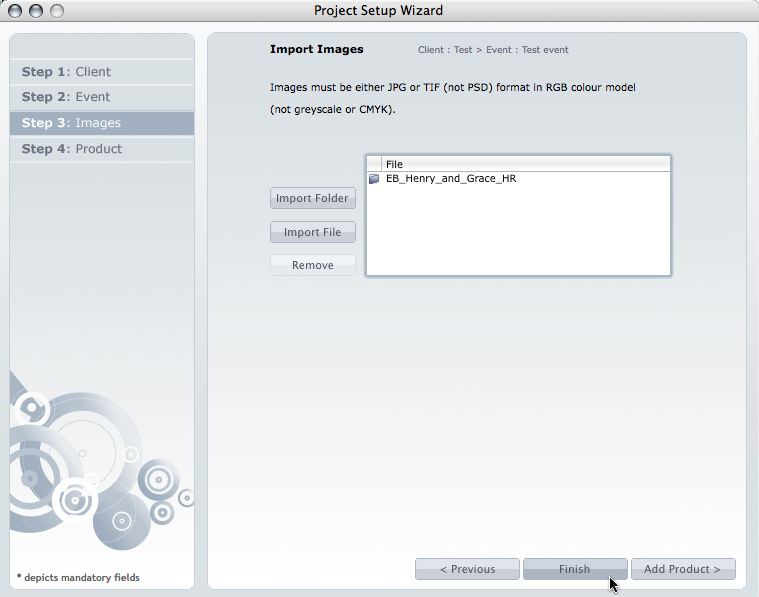
This post is now superseded by new functionality in Photojunction v1.22 and later). If you use Queensberry to design your albums we want to make the process as smooth as possible. Here’s how to go about it. (The PJ work sounds more complicated than it is, but we’re here to help if you need it. Follow the links for further information.) 1. Open up PJ Remix and click the Start New Project button. This fires up the Project Set-up Wizard for you to enter your Client and Event details and import the images. 2. Click Finish when you're done setting up the Project. Remix will import the images and To View More >>
This entry was posted in by Admin


